This article covers the tab for adding payment methods.
We recommend reading the article: Store section overview
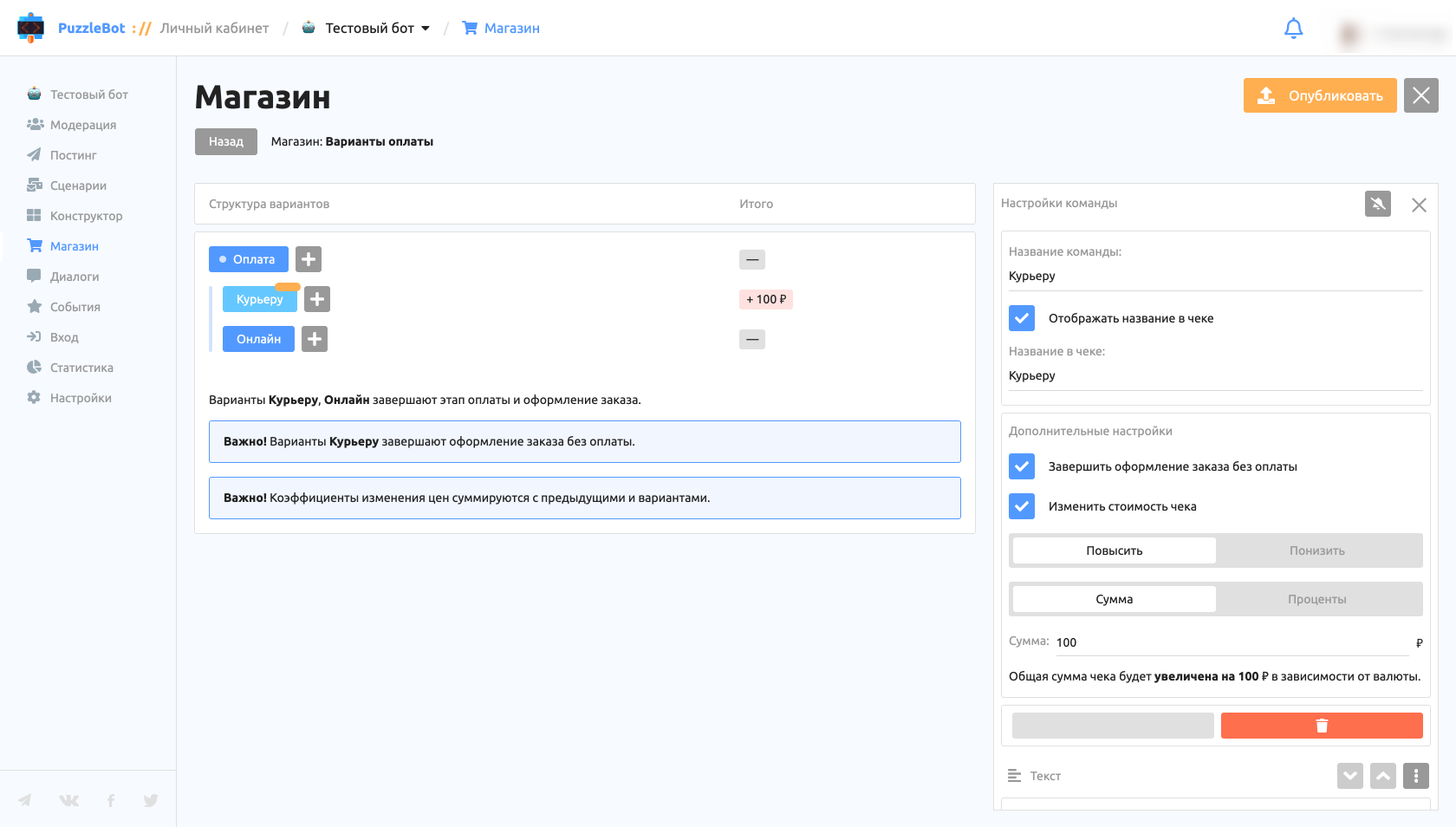
The Payment method tab is a lightweight version of the Constructor tab that works by the same rules: all changes must be published (the button in the top right corner). To create a sub-option, click the gray + button next to the parent command.
Important! Unlike commands in Delivery methods, commands without sub-options in Payment methods have the Finish checkout without payment option, which lets the user complete an order without paying in the bot.
How the tab works:
You cannot set up a transition to commands outside the tab.
You cannot set up a transition to commands that are not in the same branch.
You cannot publish changes if no buttons with transitions have been created between the commands.
The answers and names of input forms are automatically added to the order summary.
Price changes add up across all the commands the user selected.
Command settings:
Show name in receipt — lets you hide or show the command name in the receipt, and set a different name to show in the receipt.
Change receipt total — lets you raise or lower the receipt total when the user goes to the command. You can set it as a percentage or as a fixed amount.
Important! If several currencies are set, you must set a fixed amount for each currency.
Important! Receipt total changes add up across all the commands the user selected.