This article documents outgoing requests from puzzlebot. If you need it, see the documentation on incoming requests: Incoming requests (API).
There are 3 ways to make an outgoing request:
Duplicating all Telegram Bot API requests.
A custom request in the actions of any command.
Outgoing requests on a specific event (Event subscriptions).
Duplicating all Telegram Bot API requests
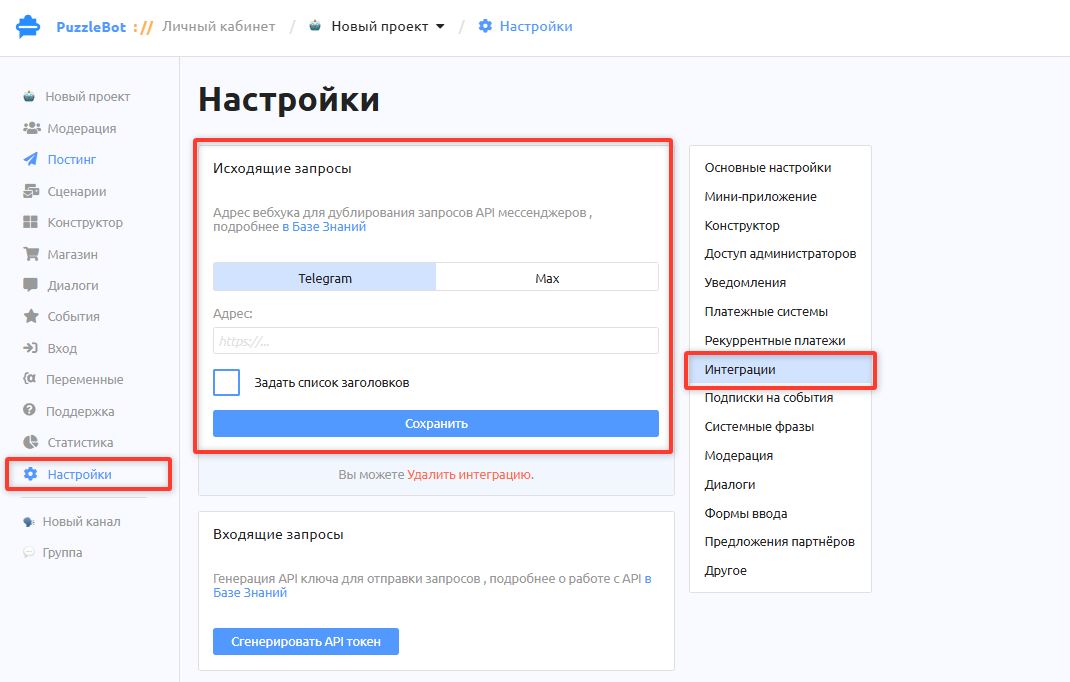
To send all bot activity to a remote server, open the page of the project you need and go to Settings — Integrations — Outgoing requests — select the messenger you want to receive events from and enter the webhook address.
Sending a request from commands or conditions
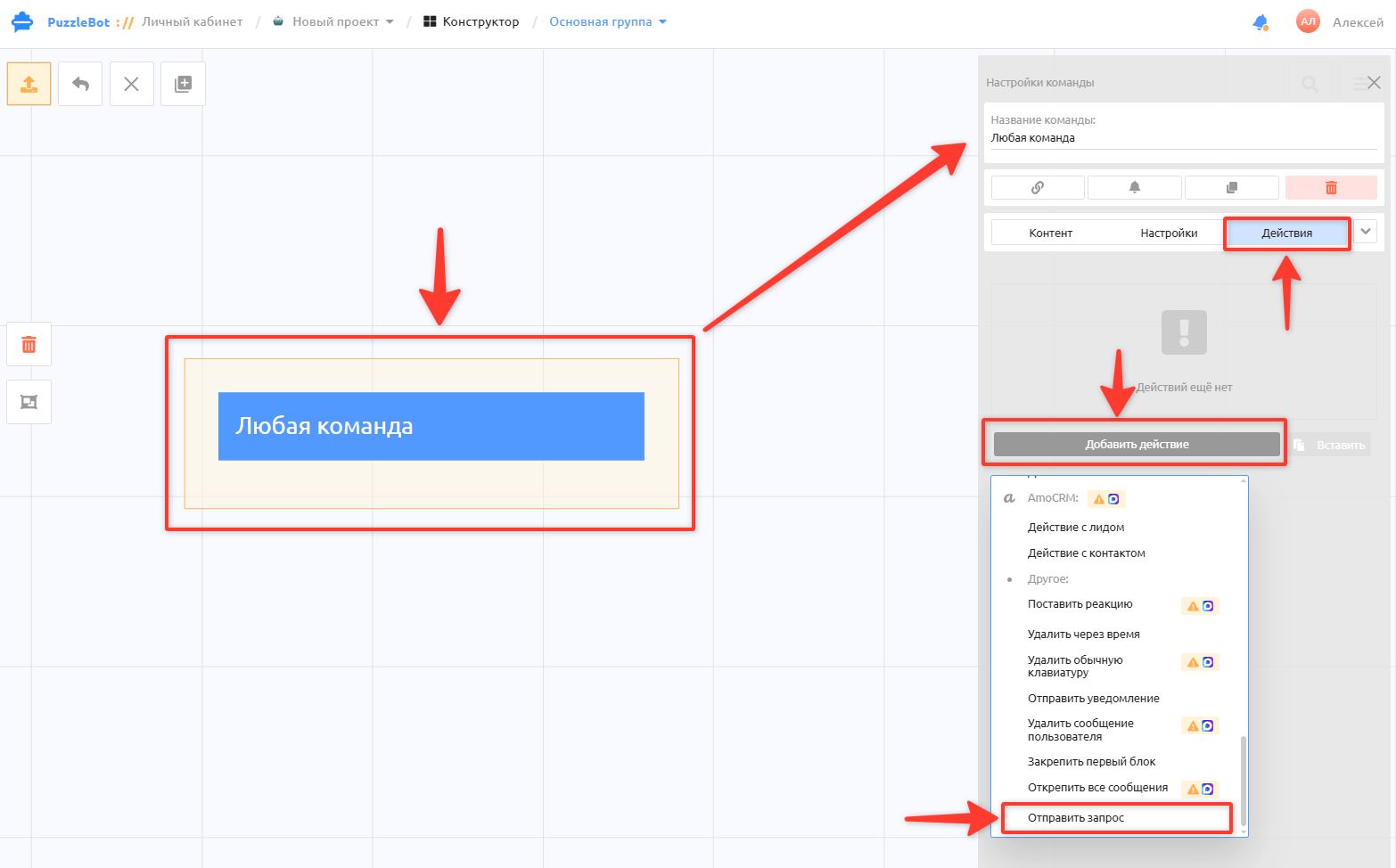
To send a custom request from a command, open the Actions tab → Add action → "Send request".
In conditions: Add action → "Send request".
In the settings of this action, enter the server address and select the request type (GET, POST, DELETE, PUT, PATCH). You can set the parameters to pass in Key — Value format and, if needed, Headers.
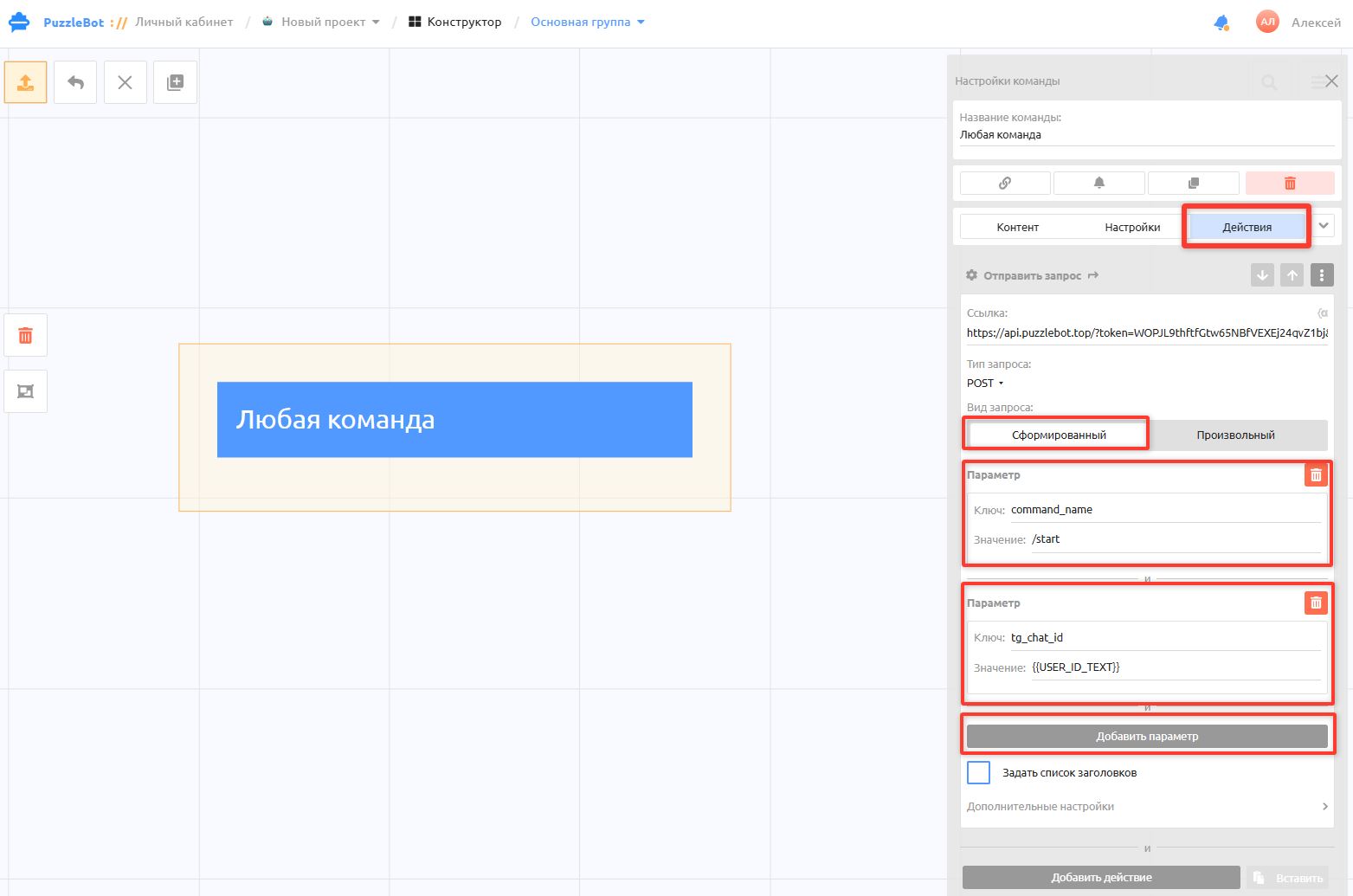
Example of a request built from parameters
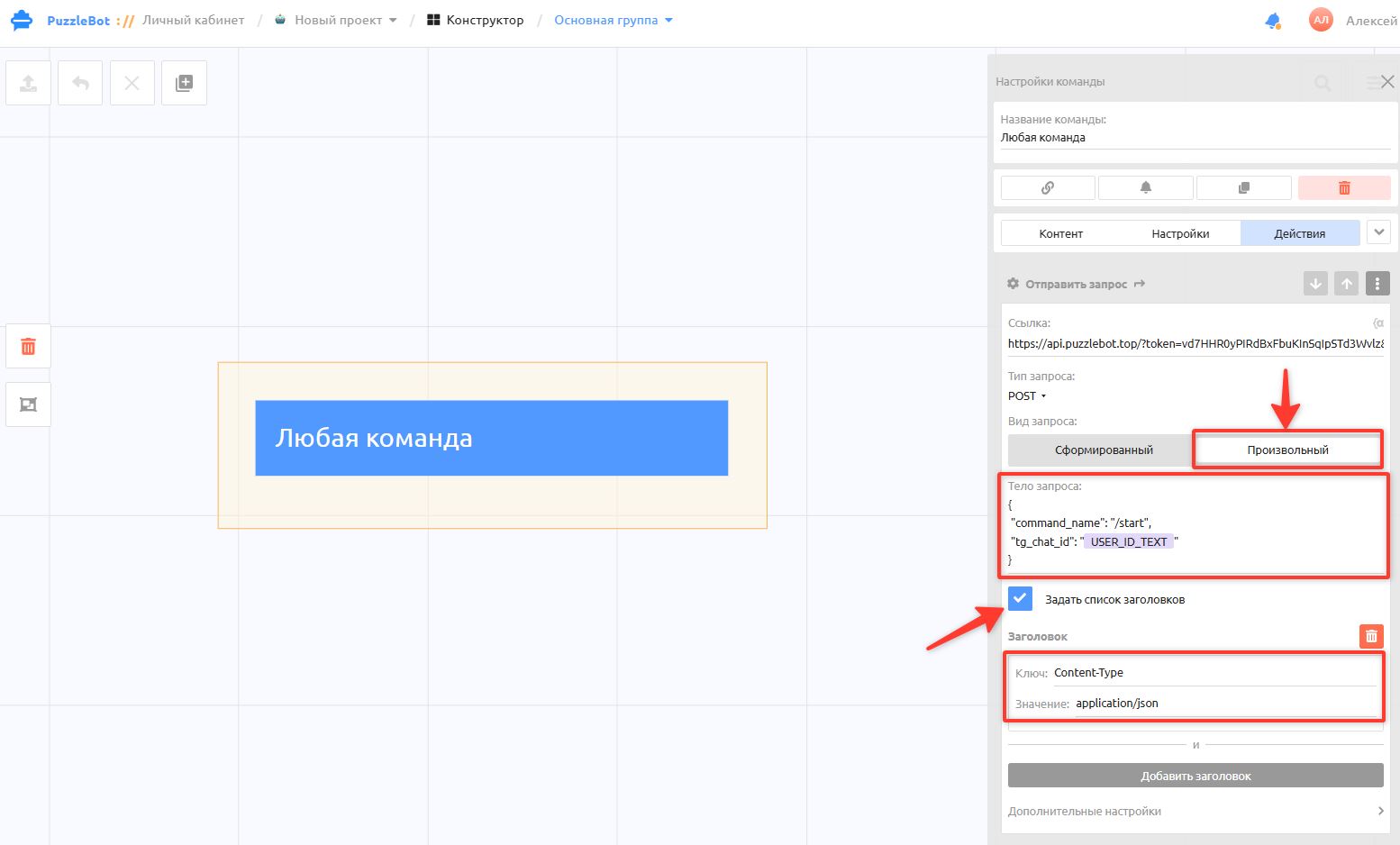
Example of a custom request in JSON format
A custom request body (for example, in JSON format) is available only for POST, PUT and PATCH requests.
To send JSON in the request body correctly, add the corresponding header (Content-Type: application/json)
Important! You cannot get a response to requests made with the "Send request" action! For requests that require a response, use Integrated variables.
Event subscriptions
Event subscriptions is a feature that lets you send only specific selected events to a third-party service (or server).
Event types:
Command call — sends a request when any command is called.
Command call from a command group — sends a request when a command from a specific command group is called.
Input form answer — sends a request with the answer to an input form.
Input form answers of specified commands — sends a request with input form answers grouped by command.
Any message — sends a request with the user's message.
User joined the chat
User left the chat
Notifications — sends a request that duplicates a notification.
Link activation — sends a request with information about a link activation.
Order placed in the Store — sends a request when an order is placed in the Store.
Order status change — sends a request when the order status changes.
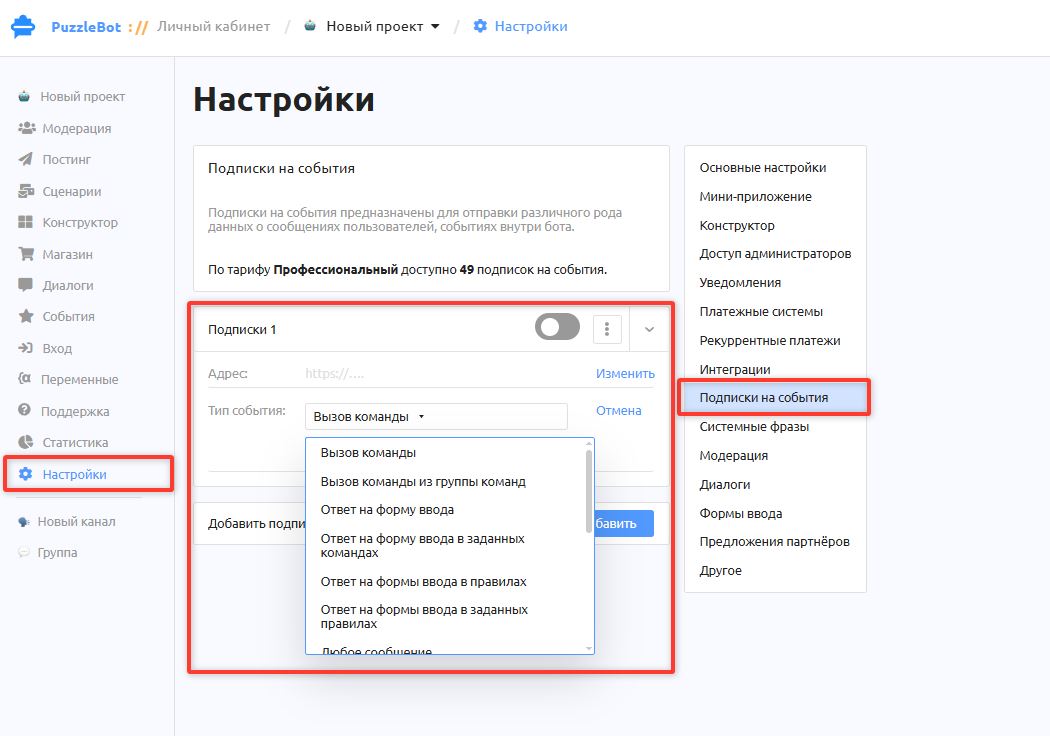
To set up event subscriptions, go to Settings — Event subscriptions on the project page and click Add — enter the webhook address and select the event to send.
When the selected condition is met, a request encoded in JSON format is sent to the specified URL (address).
Any message (any_message):
"date" — Date as a timestamp,
"bot"
"id" — Bot ID,
"username" — Bot username,
"first_name" — Bot name.
"chat"
"id" — Chat ID,
"type" — Chat type ("private", "channel", "group" or "supergroup"),
"first_name" — Bot name (may be absent if this is not a bot),
"title" — Resource name (may be absent if this is a bot),
"username" — Username of the resource (bot, channel or supergroup),
"members_count" — Number of members in the chat.
"user"
"id" — User ID,
"first_name" — User's first name,
"last_name" — User's last name,
"username" — User's username,
"is_bot" — Whether the user is a bot (true or false),
"category_name" — Name of the user category.
"message" — Message text,
"type_subscribe_event":"any_message",
"name" — Name of the event subscription.
Command call (call_command):
"date" — Date as a timestamp,
"bot"
"id" — Bot ID,
"username" — Bot username,
"first_name" — Bot name.
"chat"
"id" — Chat ID,
"type" — Chat type ("private", "channel", "group" or "supergroup"),
"first_name" — Bot name (may be absent if this is not a bot),
"title" — Resource name (may be absent if this is a bot),
"username" — Username of the resource (bot, channel or supergroup),
"members_count" — Number of members in the chat.
"user"
"id" — User ID,
"first_name" — User's first name,
"last_name" — User's last name,
"username" — User's username,
"is_bot" — Whether the user is a bot (true or false),
"category_name" — Name of the user category.
"command"
"name" — Command name,
"group_name" — Name of the command's group,
"call_type" — Command call type ("reply" or "inline").
"type_subscribe_event":"call_command",
"name" — Name of the event subscription.
Command call from a group (call_command_from_group):
"date" — Date as a timestamp,
"bot"
"id" — Bot ID,
"username" — Bot username,
"first_name" — Bot name.
"chat"
"id" — Chat ID,
"type" — Chat type ("private", "channel", "group" or "supergroup"),
"first_name" — Bot name (may be absent if this is not a bot),
"title" — Resource name (may be absent if this is a bot),
"username" — Username of the resource (bot, channel or supergroup),
"members_count" — Number of members in the chat.
"user"
"id" — User ID,
"first_name" — User's first name,
"last_name" — User's last name,
"username" — User's username,
"is_bot" — Whether the user is a bot (true or false),
"category_name" — Name of the user category.
"command"
"name" — Command name,
"group_name" — Name of the command's group,
"call_type" — Command call type ("reply" or "inline").
"type_subscribe_event":"call_command_from_group",
"name" — Name of the event subscription.
Input form answer (form_answers):
"date" — Date as a timestamp,
"bot"
"id" — Bot ID,
"username" — Bot username,
"first_name" — Bot name.
"chat"
"id" — Chat ID,
"type" — Chat type ("private", "channel", "group" or "supergroup"),
"first_name" — Bot name (may be absent if this is not a bot),
"title" — Resource name (may be absent if this is a bot),
"username" — Username of the resource (bot, channel or supergroup),
"members_count" — Number of members in the chat.
"user"
"id" — User ID,
"first_name" — User's first name,
"last_name" — User's last name,
"username" — User's username,
"is_bot" — Whether the user is a bot (true or false),
"category_name" — Name of the user category.
"type_subscribe_event":"form_answers",
"name" — Name of the event subscription,
"forms" — Array of form answers,
"name" — Name of form 1,
"input_type" — Form type ("options" — Option selection, "exam" — Quiz, "message" — Sending a message, "request_contact" — Contact request, "request_location" — Location request)
"block_type" — Block type ("normal" — Regular, "telegram" — Telegram. Only for the Option selection and Quiz types),
"type" — Mask of form 1 (only for the Sending a message type),
"variable" — Variable of form 1,
"answer" — Answer to form 1,
"caption" — Caption of file 1 (if a file was sent).
"file_ids" — File ID.
Input form answers of specified commands (custom_form_answers):
"date" — Date as a timestamp,
"bot"
"id" — Bot ID,
"username" — Bot username,
"first_name" — Bot name.
"chat"
"id" — Chat ID,
"type" — Chat type ("private", "channel", "group" or "supergroup"),
"first_name" — Bot name (may be absent if this is not a bot),
"title" — Resource name (may be absent if this is a bot),
"username" — Username of the resource (bot, channel or supergroup),
"members_count" — Number of members in the chat.
"user"
"id" — User ID,
"first_name" — User's first name,
"last_name" — User's last name,
"username" — User's username,
"is_bot" — Whether the user is a bot (true or false),
"category_name" — Name of the user category.
"type_subscribe_event":"custom_form_answers",
"name" — Name of the event subscription,
"forms" — Array of form answers,
"name" — Name of form 1,
"input_type" — Form type ("options" — Option selection, "exam" — Quiz, "message" — Sending a message, "request_contact" — Contact request, "request_location" — Location request)
"block_type" — Block type ("normal" — Regular, "telegram" — Telegram. Only for the Option selection and Quiz types),
"type" — Mask of form 1 (only for the Sending a message type),
"variable" — Variable of form 1,
"answer" — Answer to form 1,
"caption" — Caption of file 1 (if a file was sent).
"file_ids" — File ID.
Important! To view the answer to a different input form, use its numeric index in square brackets after the "forms" field.
User joined the chat (new_member):
"date" — Date as a timestamp,
"bot"
"id" — Bot ID,
"username" — Bot username,
"first_name" — Bot name.
"chat"
"id" — Chat ID,
"type" — Chat type ("private", "channel", "group" or "supergroup"),
"first_name" — Bot name (may be absent if this is not a bot),
"title" — Resource name (may be absent if this is a bot),
"username" — Username of the resource (bot, channel or supergroup),
"members_count" — Number of members in the chat.
"user"
"id" — User ID,
"first_name" — User's first name,
"last_name" — User's last name,
"username" — User's username,
"is_bot" — Whether the user is a bot (true or false),
"category_name" — Name of the user category.
"type_subscribe_event":"new_member",
"name" — Name of the event subscription.
User left the chat (left_member):
"date" — Date as a timestamp,
"bot"
"id" — Bot ID,
"username" — Bot username,
"first_name" — Bot name.
"chat"
"id" — Chat ID,
"type" — Chat type ("private", "channel", "group" or "supergroup"),
"first_name" — Bot name (may be absent if this is not a bot),
"title" — Resource name (may be absent if this is a bot),
"username" — Username of the resource (bot, channel or supergroup),
"members_count" — Number of members in the chat.
"user"
"id" — User ID,
"first_name" — User's first name,
"last_name" — User's last name,
"username" — User's username,
"is_bot" — Whether the user is a bot (true or false),
"category_name" — Name of the user category.
"type_subscribe_event":"left_member",
"name" — Name of the event subscription.
Link activation (activate_link):
"date" — Date as a timestamp,
"bot"
"id" — Bot ID,
"username" — Bot username,
"first_name" — Bot name.
"chat"
"id" — Chat ID,
"type" — Chat type ("private", "channel", "group" or "supergroup"),
"first_name" — Bot name (may be absent if this is not a bot),
"title" — Resource name (may be absent if this is a bot),
"username" — Username of the resource (bot, channel or supergroup),
"members_count" — Number of members in the chat.
"user"
"id" — User ID,
"first_name" — User's first name,
"last_name" — User's last name,
"username" — User's username,
"is_bot" — Whether the user is a bot (true or false),
"category_name" — Name of the user category.
"link"
"invited_by" — Information about who invited the user (referral links only),
"id" — User ID,
"first_name" — User's first name,
"last_name" — User's last name,
"username" — User's username.
"key" — Link key,
"type" — Link type ("multiple", "promo" or "referal").
"type_subscribe_event":"activate_link",
"name" — Name of the event subscription.
Notifications (notifications):
start_dialog, end_dialog, any_message_in_dialog, unconfirmed_leave, new_request_resource, post_in_queue, post_sent, new_payment, failed_payment
"date" — Date as a timestamp,
"bot"
"id" — Bot ID,
"username" — Bot username,
"first_name" — Bot name.
Only for unconfirmed_leave and new_request_resource
"chat"
"id" — Chat ID,
"type" — Chat type ("private", "channel", "group" or "supergroup"),
"first_name" — Bot name (may be absent if this is not a bot),
"title" — Resource name (may be absent if this is a bot),
"username" — Username of the resource (bot, channel or supergroup),
"members_count" — Number of members in the chat.
Only for start_dialog, end_dialog, any_message_in_dialog, new_payment and failed_payment
"user"
"id" — User ID,
"first_name" — User's first name,
"last_name" — User's last name,
"username" — User's username,
"is_bot" — Whether the user is a bot (true or false),
"category_name" — Name of the user category.
"type_subscribe_event" — Event subscription type,
"name" — Name of the event subscription,
"text" — Notification text,
"type_notification" — Notification type.
Only for new_payment and failed_payment
"payment"
"sum" — Payment amount,
"name" — Payment name,
"status" — Status* ("ok" or "failed").