This article covers the syntax and rules for writing an expression or formula to change a variable.
Learn more about how variables work: Variables section overview.
Since the update of December 31, 2024, formulas in text are available. With them, you don't have to add separate variables or create an action: just write the formula in the text, for example:
{{=100-45=}}. Formulas in text also support variables.
General rules
The number of spaces outside the quotes
“ ”doesn't matter.Any number or text in the examples below can be replaced with a variable.
For two or more values to interact, an operator is required between them.
Order of operations:
Calculations in all parentheses are performed first, starting with the most deeply nested ones (example: (2 + 2) * 2 = 8).
Everything else is performed from left to right once the calculations inside parentheses are done.
Multiplication and division take precedence over addition and subtraction (example: 2 + 2 * 2 = 6).
Inside the parentheses, calculations are performed from left to right.
Important! A variable is changed after the command is called. If a command has an action that changes the variable
{{VARIABLE}}, and a text block of the same command sends the variable{{VARIABLE}}, the user receives the previous value.
Text operations (concatenation)
Simple operations
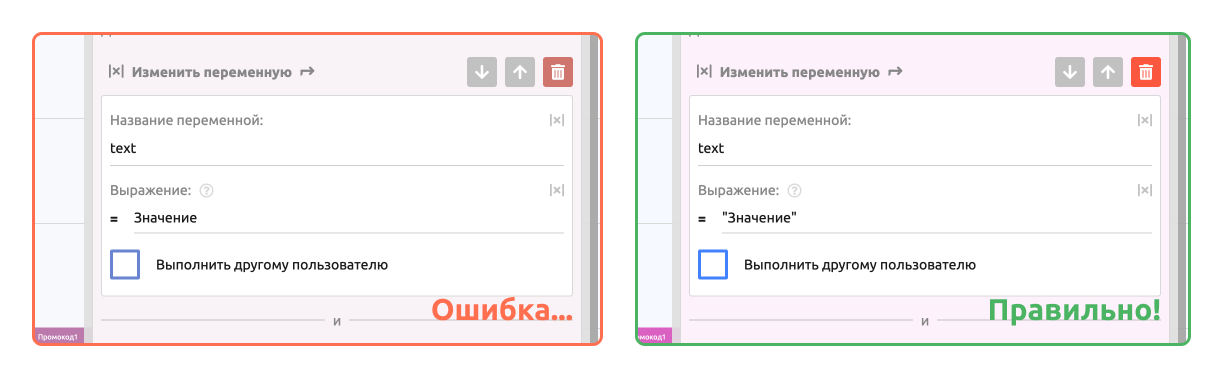
To use text in an expression or formula, put it in quotes “ ”.
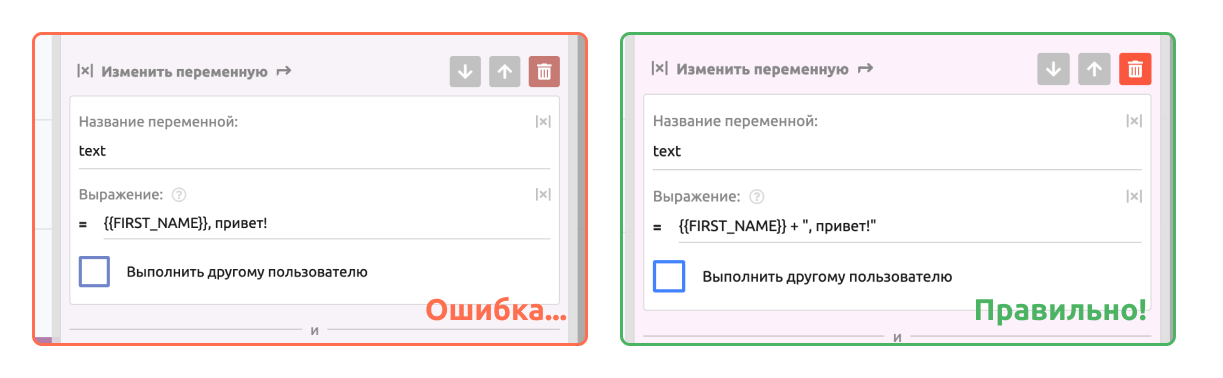
Text operations use two or more phrases or variables that contain text. In these operations, you can use only the addition operator +.
Replacing with a single value —
“Hello”= HelloConcatenating a string with a number —
"Hello" + 50= Hello50Concatenating two strings —
"Hello" + ", World"= Hello, World
Complex operations
Concatenation can include operations with numbers. Examples:
"Text" + 1 + 2= Text12"Text" + (1 + 2)= Text31 + 2 + "Text"= 3Text(1 + 2) + "Text"= 3Text
Explanation: example 1 differs from example 3 in the order of operations. All math operations are performed from left to right. In example 1, the first operation adds Text and a Number, so the rest of the result is calculated as Text. In example 3, the first operation adds a Number and a Number, so it is calculated by the rules of math, and then the Text is appended.
A clearer example: 1 + 2 + “Text” + 1 + 2 = 3Text12. Here, a Number is first added to a Number by the rules of math, and after the addition of Text, the remaining operations are also calculated as Text.
Number operations
Simple operations
Addition —
1 + 2Subtraction —
3 - 4Multiplication —
5 * 6Division —
7 / 8Exponentiation —
9 ^ 10
Complex operations
Sine (parameter in radians) —
sin(3.14159)Cosine (parameter in radians) —
cos(3.14159)Tangent (parameter in radians) —
tan(3.14159)Cotangent (parameter in radians) —
cot(3.14159)Exponential —
exp(2)Logarithm to the base of the constant e —
log(2)orln(2)Logarithm to base 10 —
log10(100)orlg(100)Absolute value —
abs(-55)Signum —
sgn(50)Square root —
sqrt(144)Rounding up —
ceil(55.5)Rounding to the nearest value with 2 decimal places —
round(12.111, 2)Rounding down —
floor(55.5)Random number from 5 to 10 —
random(5, 10)Maximum value in a set —
max(0, 1, 2, 3, 2, -2, -3, 1)Minimum value in a set —
min(0, 1, 2, 3, 2, -7, -2, -3)
Number output format
number_format(123456) = 123,456
Accepted arguments:
the number to format
the number of decimal places
the decimal separator
the thousands separator
Examples:number_format(123456) = 123,456number_format(123456, 0, ".", " ") = 123 456number_format(123456, 0, ".", ",") = 123,456number_format(123456, 3, ".", ",") = 123,456.000
String operations
Parsing a string with a regular expression —
match("prefix_DATA123", "/prefix_(.*)/")= DATA123Parsing a string and returning a specific match group —
match_all("ABC", "/([A-Z]{1})/", 0)= Amatch_all("ABC", "/([A-Z]{1})/", 1)= Bmatch_all("ABC", "/([A-Z]{1})/", 2)= C
Important! Group numbering starts at 0, not 1!
Replacing a substring in text —
replace("Hello, world", "world", "there")= Hello, thereReplacing a substring in text with a regular expression —
reg_replace("HELLO, world", "/([a-z]+)/", "there")= HELLO, there
The syntax and behavior of regular expressions follow the standards of the PHP programming language.
In formulas with regular expressions, you can use the flags (pattern modifiers) available in PHP.Example:
The variable {{var}} contains multiline text
"Line1
Line2
Line3"match_all({{var}}, "/([a-zA-Z0-9]+)/m", 0)= Line1match_all({{var}}, "/([a-zA-Z0-9]+)/m", 1)= Line2match_all({{var}}, "/([a-zA-Z0-9]+)/m", 2)= Line3
Pluralization - choosing the correct word form depending on the number
plur(number, singular, plural for 2-4, plural for 5 and more)plur(0, "bot","bota","botov")— 0 botovplur(101, "bot", "bota", "botov")— 101 botplur(32, "bot", "bota", "botov")— 32 bota
For languages with fewer than three forms, such as English:
plur(0, "bot", "bots")— 0 botsplur(1, "bot", "bots")— 1 botplur(2, "bot", "bots")— 2 botsplur(10, "bot", "bots")— 10 botsplur(11, "bot", "bots")— 11 botsplur(101, "bot", "bots")— 101 bots
Date and time operations
Add N days to a date —
ADD_DAYS("03.09.2023 15:34:12", 4)Add N months to a date —
ADD_MONTHS("03.09.2023 15:34:12", 4)Add N years to a date —
ADD_YEARS("03.09.2023 15:34:12", 4)Add N hours to a date —
ADD_HOURS("15:34:12", 4)orADD_HOURS("03.09.2023 15:34:12", 2)Add N minutes to a date —
ADD_MINUTES("03.09.2023 15:34:12", 4)Add N seconds to a date —
ADD_SECONDS("03.09.2023 15:34:12", 4)Difference in days between two dates —
DAYS_BETWEEN("15.09.2023 15:34:12", "11.09.2023 15:34:12")Difference in hours between two dates —
HOURS_BETWEEN("30.08.2023 23:00", "29.08.2023 22:00")Convert a date to the required format —
DATE_FORMAT("15.09.2023 15:34:12", "d F Y")
To subtract, pass a negative number of days, months, years and so on. Example: ADD_HOURS("03.09.2023 15:34:12", -2) = 03.09.2023 13:34:12.
The date format can be any of the common ones (01.12.2023 | 01/12/2023 | 2023-12-01), but the year must always have 4 digits.
ADD_* functions return the date in the same format as the input
Comparison operators
for numbers —
==, !=, >=, <=
Example: 1 == 1 --> 1; 1 != 1 --> 0for strings —
==, !=
Example: "aa" == "bb" --> 0; "aa" != "bb" --> 1
Comparison operators for numbers can be combined with calculations. For example:
1 + 2 == 3 --> 1;
1 + 2 == 4 --> 0;
5 + 2 == 8 - 1 --> 1
The IF function and the AND/OR logical operators
if(condition, true, false) — if the condition is met, the second operand (true) is returned as the value; otherwise, the third operand (false) is returned
if(0, "yes", "no")--> noif(1, "yes", "no")--> yes
The OR and AND logical operators combined with the IF function:
if(10 > 5 , "yes", "no")--> yesif(10 > 20 , "yes", "no")--> noif(10 > 20 && 2 < 3 , "yes", "no")--> noif(10 > 20 && 4 < 3 , "yes", "no")--> noif(20 > 10 && 4 < 3 , "yes", "no")--> noif(20 > 10 && 3 < 4 , "yes", "no")--> yesif(10 > 20 || 2 < 3 , "yes", "no")--> yesif(10 > 20 || 4 < 3 , "yes", "no")--> noif(20 > 10 || 4 < 3 , "yes", "no")--> yesif(20 > 10 || 3 < 4 , "yes", "no")--> yes
You can use variables in functions. For example:
if({{VAR1}} > {{VAR2}} , {{VAR3}}, {{VAR4}})— if the value of VAR1 is greater than the value of VAR2, the result is the value of VAR3; otherwise, the value of VAR4
Important! In operations, there must be spaces to the left and right of comparison and arithmetic operators.
If a comma could be read as part of a value, separate it with a space.
For example:
if(12<10,"yes","no")— incorrect, because the validator reads "10," instead of "10"if(12<10 , "yes", "no")— correct.
Other
hmac_sha1— signs a message with the sha1 algorithm (first argument = message, second argument = secret key)
hmac_sha1("message","secret") = 0caf649feee4953d87bf903ac1176c45e028df16
hmac_sha256— signs a message with the sha256 algorithm (first argument = message, second argument = secret key)
hmac_sha256("message", "secret") = 8b5f48702995c1598c573db1e21866a9b825d4a794d169d7060a03605796360b
hmac_sha384— signs a message with the sha384 algorithm (first argument = message, second argument = secret key)
hmac_sha384("message", "secret") = ad0ef4e80da427b2a33d4457c972bf759f50766fbb665690d50b7cb38dd5217db559c93ea7cbee48e2ae1a5b4aafd34b
hmac_sha512— signs a message with the sha512 algorithm (first argument = message, second argument = secret key)
hmac_sha512("message", "secret") = 1bba587c730eedba31f53abb0b6ca589e09de4e894ee455e6140807399759adaafa069eec7c01647bb173dcb17f55d22af49a18071b748c5c2edd7f7a829c632
hmac_md5— signs a message with the md5 algorithm (first argument = message, second argument = secret key)
hmac_md5("message", "secret") = 7e0d0767775312154ba16fd3af9771a2
hmac_ripemd160— signs a message with the ripemd160 algorithm (first argument = message, second argument = secret key)
hmac_ripemd160("message", "secret") = c66cf705f6c9dd35a0dfe512c7a9bd0bbcf533a2
md5— calculates an md5 hash
md5("test") = 098f6bcd4621d373cade4e832627b4f6
sha256— calculates a sha256 hash
sha256("test") = 9f86d081884c7d659a2feaa0c55ad015a3bf4f1b2b0b822cd15d6c15b0f00a08
crc32— calculates a crc32 hash
crc32("test") = 3632233996
base64_encode— encodes a string to base64
base64_encode("test") = dGVzdA==
base64_decode— decodes a base64 string
base64_decode("dGVzdA==") = test
bin2hex— converts binary data to HEX
bin2hex("aaa") = 616161
hex2bin— converts HEX data to binary
hex2bin("616161") = aaa
strlen— string length
strlen("test") = 4
json_extract— extracts data from JSON using JSON Path
json_extract({{SHOP_ORDER_LAST_RECEIPT}}, "$.price_total") = the total price of the last order in the Store
Changing case
to_lower("HELLO WORLD")— hello worldto_lower("Hello World")— hello worldto_lower("123ABC")— 123abcto_lower("")—
to_upper("hello world")— HELLO WORLDto_upper("Hello World")— HELLO WORLDto_upper("123abc")— 123ABCto_upper("")—
capitalize("hello world")— Hello worldcapitalize("hello WORLD")— Hello WORLDcapitalize("123abc")— 123abccapitalize("")—
capitalize_each("hello world test")— Hello World Testcapitalize_each("hello WORLD test")— Hello WORLD Testcapitalize_each("one two three")— One Two Threecapitalize_each("")—
uncapitalize("Hello World")— hello Worlduncapitalize("HELLO WORLD")— hELLO WORLDuncapitalize("Test")— testuncapitalize("")—
Trimming and truncating
trim(" hello world ")— hello worldtrim(" hi there ")— hi theretrim("\t\ntest\n\t")— testtrim(" ")—trim("")—
trim_left(" hello world ")— hello worldtrim_left("\t\nleft")— lefttrim_left(" test")— testtrim_left("")—
trim_right(" hello world ")— hello worldtrim_right("right\t\n")— righttrim_right("test ")— testtrim_right("")—
truncate("A long text for testing", 10)— A long textruncate("Short", 10)— Shorttruncate("Exact", 5)— Exacttruncate("", 5)—
truncate_start("A long text for testing", 10)— t for testingtruncate_start("Short text", 10)—truncate_start("Test", 4)—truncate_start("", 5)—
truncate_end("A long text for testing", 10)— A long text ftruncate_end("Short text", 10)—truncate_end("Test", 4)—truncate_end("", 5)—
Cleaning and filtering
squash_spaces(" hello world test ")— hello world testsquash_spaces("one\t\ttwo\n\nthree")— one two threesquash_spaces("normal text")— normal textsquash_spaces("")—
strip_digits("hello123world456")— helloworldstrip_digits("test 1 2 3 text")— test textstrip_digits("123456")—strip_digits("no digits here")— no digits here
strip_letters("hello123world456")— 123456strip_letters("test 1 2 3 text")— 1 2 3strip_letters("abcdef")—strip_letters("123456")— 123456
strip_specials("hello!@#world$%^")— helloworldstrip_specials("test()*+,-./:;<=>?")— teststrip_specials("normal text 123")— normaltext123strip_specials("!@#$%^&*()")—
Checking content
starts_with("hello world", "hello")— 1starts_with("hello world", "world")— 0starts_with("testing", "te")— 1starts_with("", "test")— 0starts_with("test", "")— 0
ends_with("hello world", "world")— 1ends_with("hello world", "hello")— 0ends_with("testing", "ng")— 1ends_with("", "test")— 0ends_with("test", "")— 0
contains("hello world test", "world")— 1contains("hello world test", "xyz")— 0contains("good morning", "morning")— 1contains("", "test")— 0contains("test", "")— 0
word_count("hello world test")— 3word_count("one two three four")— 4word_count("single")— 1word_count("")— 0word_count(" multiple spaces here ")— 3
Removing emoji
strip_emojis("Hello 😀 World 🌍")— Hello Worldstrip_emojis("Test 👍 🎉 emoji")— Test emojistrip_emojis("No emojis here")— No emojis herestrip_emojis("🚀🎯⭐️")— ⭐️
Validation
is_email("test@example.com")— 1is_email("invalid.email")— 0is_email("user@domain.ru")— 1is_email("")— 0is_email("test@")— 0
is_url("https://example.com")— 1is_url("http://test.ru")— 1is_url("ftp://files.com")— 1is_url("not_a_url")— 0is_url("")— 0
is_ip("192.168.1.1")— 1is_ip("2001:db8::1")— 1is_ip("invalid.ip")— 0is_ip("256.256.256.256")— 0is_ip("")— 0
is_ipv4("192.168.1.1")— 1is_ipv4("10.0.0.1")— 1is_ipv4("2001:db8::1")— 0is_ipv4("invalid")— 0is_ipv4("")— 0
is_ipv6("2001:db8::1")— 1is_ipv6("::1")— 1is_ipv6("192.168.1.1")— 0is_ipv6("invalid")— 0is_ipv6("")— 0
is_mac("00:1B:44:11:3A:B7")— 1is_mac("00-1B-44-11-3A-B7")— 1is_mac("001B44113AB7")— 0is_mac("invalid_mac")— 0is_mac("")— 0
is_phone("+7 (999) 123-45-67")— 1is_phone("89991234567")— 1is_phone("+1-555-123-4567")— 1is_phone("invalid_phone")— 0is_phone("")— 0
is_number("123")— 1is_number("123.45")— 1is_number("-67.89")— 1is_number("not_a_number")— 0is_number("")— 0is_string("hello world")— 1is_string("123")— 1is_string("")— 1is_string("true")— 1
Masking
mask_email("test@example.com")— t***@example.commask_email("user@domain.ru")— u***@domain.rumask_email("a@b.c")— *@b.cmask_email("invalid_email")— invalid_email
mask_credit_card("1234567890123456")— **** **** **** 3456mask_credit_card("4111-1111-1111-1111")— **** **** **** 1111mask_credit_card("4111 1111 1111 1111")— **** **** **** 1111mask_credit_card("invalid_card")— invalid_card
mask_name("Ivan Petrov")— I*** P*****mask_name("John Smith")— J*** S****mask_name("A")— Amask_name("")—
Extraction
extract_number("Price: 1234.56 rubles")— 1234.56extract_number("No numbers in the text")—extract_number("123 and 456 and 789")— 123extract_number("")—extract_phone("My phone: +7 (999) 123-45-67")— +7 (999) 123-45-67extract_phone("Call me 89991234567")— 89991234567extract_phone("No phone in the text")—extract_phone("")—
extract_email("Write to test@example.com")— test@example.comextract_email("Email: user@domain.ru or admin@site.com")— user@domain.ruextract_email("No email in the text")—extract_email("")—
extract_username("Follow @username")— @usernameextract_username("Users: @user1")— @user1extract_username("No username in the text")—extract_username("")—
extract_hashtag("A post with a #tag")— #tagextract_hashtag("No hashtags")—extract_hashtag("")—
extract_url("Website: https://example.com")— https://example.comextract_url("No links in the text")—extract_url("")—
Substitution
switch("apple", "apple", "this is an apple", "banana", "this is a banana", "unknown fruit")— this is an appleswitch("banana", "apple", "this is an apple", "banana", "this is a banana", "unknown fruit")— this is a bananaswitch("orange", "apple", "this is an apple", "banana", "this is a banana", "unknown fruit")— unknown fruit
To make it clearer, let's break the function down line by line:
switch("{{VARIABLE}}",—switchis the function name, and{{VARIABLE}}is a variable whose value is compared with the conditions listed below."apple", "this is an apple",— if the variable's value isapple, the formula inserts the textthis is an apple."banana", "this is a banana",— if the variable's value isbanana, the formula inserts the textthis is a banana."unknown fruit")— if the variable's value doesn't match any of the conditions, the formula inserts the textunknown fruit.
Escaping
Use the \ character to escape characters that are part of the expression syntax. The \" construct lets you use double quotes in the result of an expression. Examples:
\"" + {{FIRST_NAME_TEXT}} + "\"" = “Name”
\\ + {{USERNAME_TEXT}} + \\ = \@username\
Other constructs:
Tab
\t— adds 4 spaces on the leftLine break
\n— adds a line break